REST API (v2)
Base URL: /wp-json/wc-appointments/v2/
Discovering Available Routes
To see all available REST API routes, query the WordPress REST API index:
In Postman:
- Create a GET request
- URL:
https://your-site.com/wp-json/ - No authentication needed
- Click Send
The response shows all registered routes. Look for routes under /wc-appointments/v1/ and /wc-appointments/v2/.
Filtered views:
- V2 routes only:
https://your-site.com/wp-json/wc-appointments/v2/ - V1 routes only:
https://your-site.com/wp-json/wc-appointments/v1/
Via cURL:
# All routes
curl "https://your-site.com/wp-json/"

# Only appointment routes (v2)
curl "https://your-site.com/wp-json/wc-appointments/v2/"
If routes don't appear, see Troubleshooting: Routes Not Found.
Requirements
Permalink Configuration (Required)
Your WordPress permalinks MUST be configured to something other than "Plain". This is critical - REST API routes will not register if permalinks are set to "Plain".
- Go to Settings → Permalinks
- Choose any option EXCEPT "Plain" (e.g., "Post name", "Day and name", etc.)
- Click Save Changes (even if no changes were made)

If you get a 404 error and routes don't appear when listing all REST API routes, check your permalink settings first. Routes cannot register with "Plain" permalinks.
Plugin Activation
- WooCommerce Appointments plugin must be active
- WooCommerce must be active
- WordPress REST API must be enabled (not disabled in
wp-config.php)
Quick Start: Authentication
Application Passwords (Easiest for Testing)
Application Passwords are the quickest way to get started. Generate them from your WordPress user profile:
- Go to Users → Profile (or Users → Your Profile)
- Scroll to Application Passwords section
- Enter a name (e.g., "Postman") and click Add New Application Password
- Copy the password immediately - it's only shown once!
Usage:
curl -u username:app_password \
  "https://your-site.com/wp-json/wc-appointments/v2/appointments"
See Authentication Guide for detailed setup with Postman, Insomnia, and other tools.
WooCommerce API Keys (For Production)
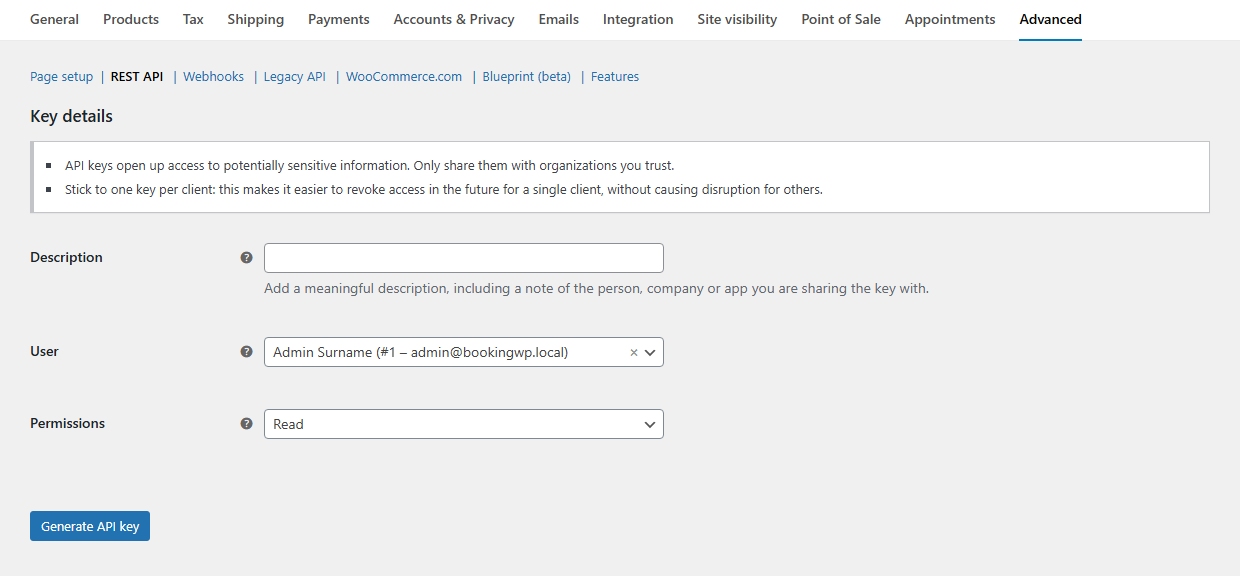
- Go to WooCommerce → Settings → Advanced → REST API
- Click Add key and generate credentials


Authentication Methods
- Application Passwords (Recommended for testing) - Generate from Users → Profile
- WooCommerce API Keys (Recommended for production) - Generate from WooCommerce → Settings → Advanced → REST API
- Cookie + Nonce (For admin UI) - Set
X-WP-Nonceheader - OAuth 1.0a (For third-party apps) - See WooCommerce REST API docs
# Example: Basic Auth with API Keys
curl -u consumer_key:consumer_secret \
  -H "Content-Type: application/json" \
  https://example.com/wp-json/wc-appointments/v2/appointments
Endpoints
Appointments
GET /appointments (filters: status, product_id, staff_id, customer_id, date_from, date_to, pagination)
GET /appointments/{id}
POST /appointments
PATCH /appointments/{id}
DELETE /appointments/{id}
curl -u admin:APP_PASSWORD -X POST \
  -H "Content-Type: application/json" \
  -d '{
    "product_id": 123,
    "start_date": "2025-12-25 10:00:00",
    "end_date": "2025-12-25 11:00:00",
    "customer_id": 1,
    "status": "confirmed"
  }' \
  https://example.com/wp-json/wc-appointments/v2/appointments
List queries use indexed cache when inside the cache horizon (includes/api/v2/class-wc-appointments-rest-v2-appointments-controller.php).
Slots (Availability)
GET /slots
Parameters: product_ids, min_date/max_date, min_timestamp/max_timestamp, staff_ids, hide_unavailable, combine_staff, pagination or limit, paged_stream.
curl -u admin:APP_PASSWORD \
  "https://example.com/wp-json/wc-appointments/v2/slots?product_ids=123&min_date=2025-12-01&max_date=2025-12-31&hide_unavailable=true"
Staff
GET /staff
Availability Rules
GET /availabilities with filter[kind], filter[kind_id], start_ts, end_ts, scope/scopes.
Write:
POST /availabilities
PATCH /availabilities/{id}
DELETE /availabilities/{id}
Example payload:
{
  "type": "custom",
  "title": "Holiday",
  "from": "2025-12-24",
  "to": "2025-12-26",
  "appointable": false,
  "priority": 10,
  "kind": "availability#product",
  "kind_id": 123
}
Index
GET /index — start_ts, end_ts required; optional product_id, staff_id.
curl -u admin:APP_PASSWORD \
  "https://example.com/wp-json/wc-appointments/v2/index?start_ts=1764547200&end_ts=1764719999&product_id=123"
Server-Sent Events (SSE)
GET /sse — stream updates for admin dashboards.
- Header:
X-WP-Nonce. - Resume:
since_idorLast-Event-ID.
curl -H "X-WP-Nonce: YOUR_NONCE" \
  "https://example.com/wp-json/wc-appointments/v2/sse?since_id=100"