Membership Credits
Membership credits (5.4+) work with WooCommerce Subscriptions: customers buy a subscription product that grants appointment credits each billing period, then book eligible appointable products at $0 checkout when a credit applies.
Which feature do I need?
| You want… | Use | Requires |
|---|---|---|
| Fixed session pack (e.g. 8 weekly classes), prepaid or pay-first | Recurring packages | Appointable product, WooCommerce Appointments 5.4+ |
| Ongoing subscription with X bookings per billing period | Membership credits (this page) | WooCommerce Subscriptions |
| Both — members use credits; everyone else buys packs | Recurring packages and membership credits | WCS + appointable products (separate product types) |
Membership credits apply when booking an appointable product with Use membership credit. Recurring packages use Repeat this appointment on the same appointable product. Credits do not apply on a recurring package checkout line.
How it works
A subscription product (not appointable) grants a pool of credits each billing period. Customers book appointable products separately, toggle Use membership credit on the form, and checkout at $0 when fully covered. Credits are consumed when the appointment order is paid.
What you need
- WooCommerce Subscriptions active
- A Subscription product with the Appointments tab enabled
- At least one appointable product for customers to book (or restrict via eligible products list)
What you get
- ✅ Credits granted each billing period (or Unlimited)
- ✅ Optional rollover of unused credits
- ✅ Credit picker on the booking form; $0 checkout when covered
- ✅ Credits restored when a credit-booked appointment is cancelled/refunded
Not this
- ❌ Recurring appointment packages — fixed RRULE series on an appointable product
- ❌ An appointable product cannot also be a subscription product (separate products)
Important
- Recurring package = class pack on appointable product, one checkout for N sessions
- Membership credits = ongoing plan, credits per renewal, book anytime on eligible products
- Credits do not apply when Repeat this appointment is checked (packages use their own rules)
- On-hold subscriptions cannot consume credits until active again
Setup order: Subscription product setup → Customer journey → My Account → Admin
Subscription product setup
Edit a Subscription product → Appointments tab:
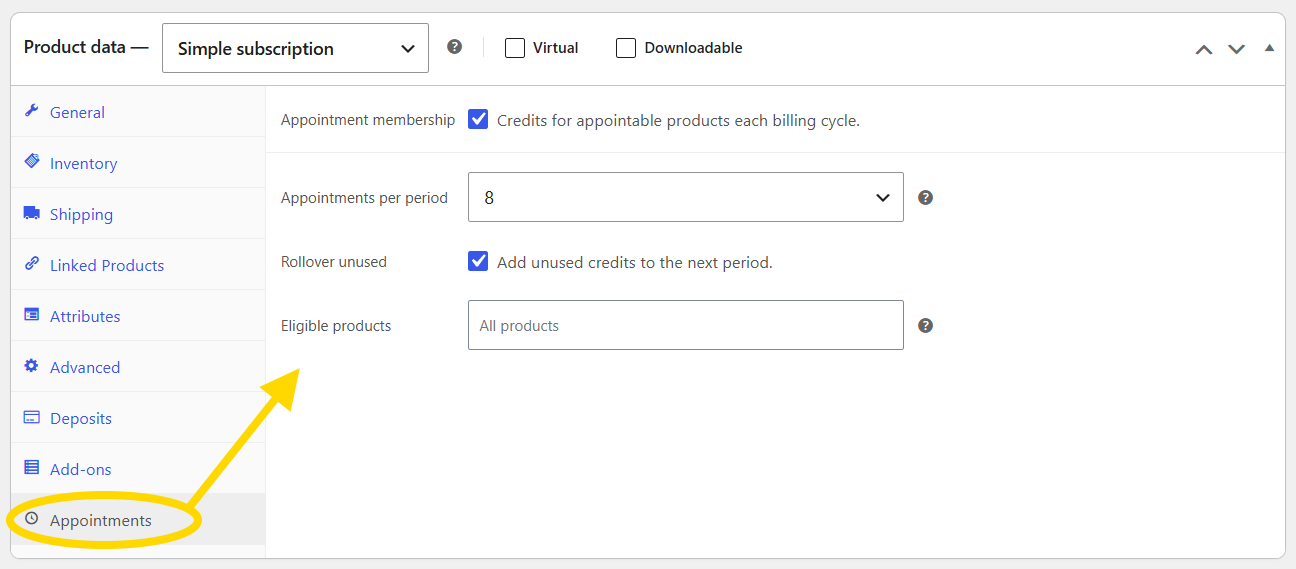
| Field | Purpose |
|---|---|
| Enable appointment membership | This subscription grants bookable credits |
| Appointments per billing period | Credits granted each renewal (or Unlimited) |
| Rollover unused credits | Add new period credits to existing balance instead of replacing |
| Eligible appointable products | Limit which products credits apply to; empty = all appointable products |
Standard WooCommerce Subscriptions pricing (recurring fee, interval, sign-up fee, trial) is configured on the General tab as usual.
Customer journey
1. Subscribe
Customer purchases the membership subscription through normal WCS checkout. No appointment picker appears on the subscription product page.
On activation:
- Credits are granted for the current billing period
- A Book appointment link may appear on the thank-you page and in My Account
2. Book with credits
On an eligible appointable product:
- Customer selects date/time (single appointment — not a recurring package)
- When a membership applies, the booking form shows Use membership credit
- If multiple active memberships qualify, the customer picks a plan
- Add to cart → line total $0 when fully covered by credits
- Checkout → credit is consumed when the order is paid
Credits do not apply when Repeat this appointment (recurring package) is checked. One membership credit applies per billable session in a package checkout when packages and credits are combined per product rules.
3. Renewals
When a renewal payment completes:
- New period credits are granted (replaces balance, or rolls over if enabled)
- Credits are not granted before payment succeeds
4. Cancel or refund
If an appointment order booked with credits is cancelled or refunded, credits are restored to the subscription wallet (subject to plan limits).
On-hold subscriptions
When the subscription is on-hold, credits cannot be consumed. My Account may show a notice until the subscription is active again.
My Account
- Appointments list shows upcoming bookings and a compact membership credit summary when relevant
- Book appointment CTA links to the first eligible appointable product (or configured product)
- Credit balance reflects reservations in cart where applicable
Storefront UI
- Booking form footer: credit toggle and plan selection
- Cart/checkout: confirms credit application on the line item
- Order item meta records credits consumed for support and reporting
Admin
- Subscription order screen: standard WCS UI; credit balance stored on the subscription object
- No separate Settings → Appointments section for credits — configuration is per subscription product
Requirements
- WooCommerce Subscriptions active
- Appointable products for customers to book
- Membership enabled on at least one subscription product
Developers
wc_appointments_membership_booking_context— adjust credit application context (see Hooks after developer login)
Related
- Recurring appointment packages
- Integrations — WooCommerce Subscriptions section
- Known Issues — Subscriptions compatibility notes