Recurring Appointment Packages
Recurring appointment packages (5.4+) let customers book a series of sessions in one checkout — for example, 8 weekly yoga classes or a 12-session treatment plan.
Which feature do I need?
| You want… | Use | Requires |
|---|---|---|
| Fixed session pack (e.g. 8 weekly classes), prepaid or pay-first | Recurring packages (this page) | Appointable product, WooCommerce Appointments 5.4+ |
| Ongoing subscription with X bookings per billing period | Membership credits | WooCommerce Subscriptions |
| Both — members use credits; everyone else buys packs | Recurring packages and membership credits | WCS + appointable products (separate product types) |
Recurring packages live on an appointable product (Repeat this appointment). Membership credits live on a subscription product (Appointments tab). A product cannot be both types — use two products when you need both models.
| Term | Meaning |
|---|---|
| Package | Merchant-facing label — what the customer buys (e.g. “8-class pack”) |
| Series | Code and REST entity (WC_Appointment_Series, /v2/series) — one RRULE schedule + payment record |
| Session / occurrence | A single appointment in the series |
How it works
Customers pick a slot, enable Repeat this appointment, choose a pattern (daily, weekly, or monthly) and session count, then checkout once. The plugin creates a series record and materializes each session as its own appointment (RRULE scheduling).
What you need
- WooCommerce Appointments 5.4+
- An appointable product with Can be recurring? enabled
- Availability for the previewed sessions (partial checkout may apply when allowed)
What you get
- ✅ Multi-session packages in one checkout (prepaid or pay-first)
- ✅ Repeat picker with live preview on the booking form
- ✅ Pay-first balance orders for remaining sessions
- ✅ Admin panel series view and My Account → View series
- ✅ Appointments in package pricing rules and once-per-series add-ons
Not this
- ❌ Open-ended subscriptions on appointable products — use Membership credits
- ❌ WooCommerce Deposits on the same recurring checkout line (pay-first uses balance orders)
Important
- Package / series = the purchase; session / occurrence = one appointment in the list
- Prepaid = full package charged at checkout; Pay-first = first session now, remainder on a balance order
- Enabled site-wide by default — disable with
wc_appointments_recurring_enabled - Settings → Appointments → Recurring packages was removed in 5.4; defaults use filters (see Pay-first section)
Setup order: Product setup → Storefront booking → Cart & checkout → Pay-first & balance orders → Admin → My Account
Product setup
On an appointable product → General tab, below reschedule options:
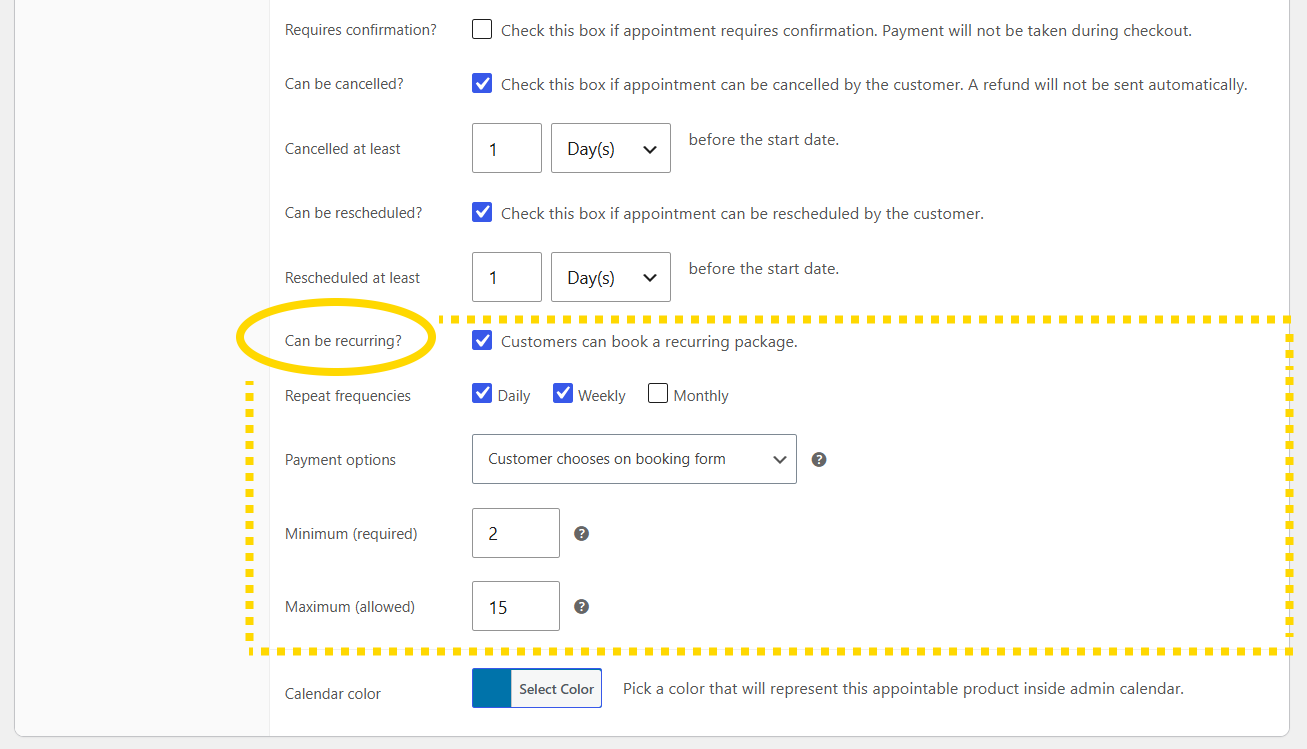
Can be recurring?
Enable Can be recurring? to show the Repeat this appointment picker on the storefront.
Repeat frequencies
Choose which patterns customers may use:
- Daily
- Weekly
- Monthly
Session limits
Set minimum and maximum occurrences (sessions) per package. Filters can adjust limits per product:
wc_appointments_recurring_min_occurrenceswc_appointments_recurring_max_occurrenceswc_appointments_recurring_min_billable_sessions
Payment model
| Setting | Storefront behavior |
|---|---|
| Pay for all appointments now | Prepaid only |
| Pay for first appointment only | Pay-first only |
| Customer chooses on booking form | Customer picks prepaid or pay-first |
Filters:
wc_appointments_recurring_payment_options— limit offered modelswc_appointments_recurring_default_payment_model— pre-selected option
Package pricing
Use Pricing tab rules with Appointments in package to discount longer series (adjusts package subtotal). See Pricing Rules.
Storefront booking
After the customer picks a date/time (and staff, add-ons, etc.):
- Check Repeat this appointment
- Choose frequency, interval, and number of sessions
- Review the live preview of upcoming sessions and totals
- Choose prepaid or pay-first when the product allows both
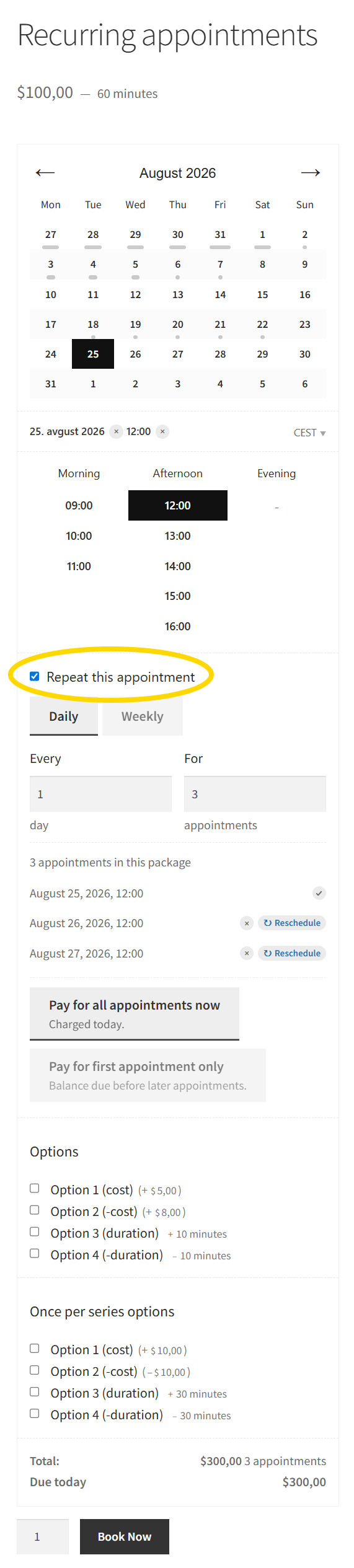
The cost footer shows:
- Prepaid: full package total due at checkout
- Pay-first: first session due now + remaining balance summary
WooCommerce Deposits is hidden during recurring checkout. Pay-first packages use balance orders for the remainder, not deposit rules on the same line.
Partial checkout: if some preview sessions are unavailable, checkout may proceed with available sessions when wc_appointments_recurring_allow_partial_checkout allows it (default: true).
Cart & checkout
The cart line describes the package (product, pattern, session count) rather than a single slot.
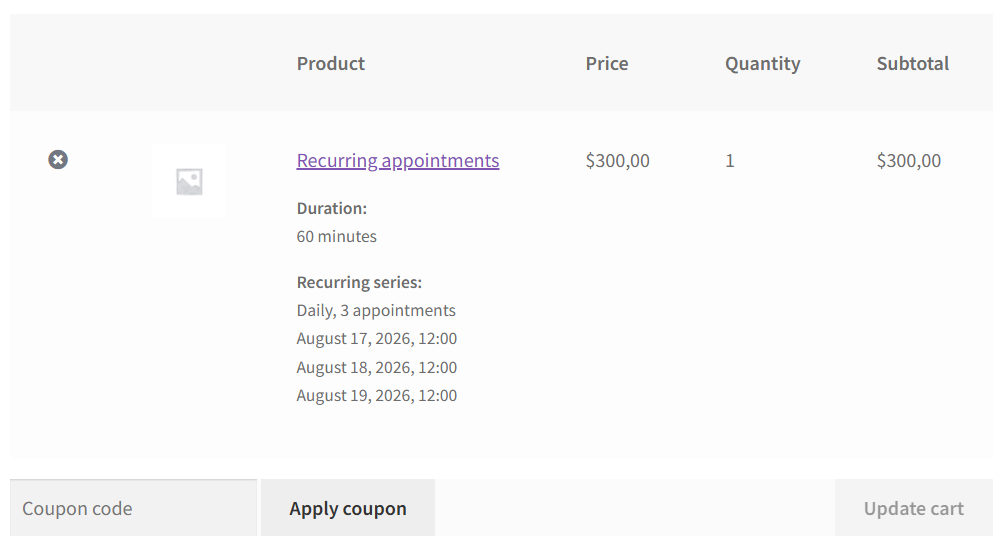
On order confirmation (when the order reaches on-hold, processing, completed, or partial-payment):
- Prepaid: series is created; all occurrence appointments are materialized
- Pay-first: first session is paid on the parent order; balance order is created for the remainder (see below)
Offline gateways that leave the order on-hold (cheque, BACS) still create the series and appointments. Pending payment alone does not.
Membership credits: one credit per billable session in the series at checkout when credits apply. See Membership credits.
Pay-first & balance orders
Add filters in your child theme's functions.php or a small site-specific plugin — not in the plugin files (updates will overwrite them). See Where to add code.
When the customer chooses pay-first:
- Checkout charges the first session (plus once-per-series add-ons, etc.)
- On confirmation, a balance order is created for the remaining package total
- Customer pays via Pay remaining balance (My Account, order emails, or staff actions)
Automatic balance order
Balance orders are created automatically when the series is confirmed at checkout (default). Opt out:
add_filter( 'wc_appointments_recurring_auto_create_balance_order', '__return_false' );
Balance invoice timing
// Default: 'manual' — staff/customer triggers balance invoice
add_filter( 'wc_appointments_recurring_balance_invoice_timing', function () {
    return 'on_balance_order_created'; // send when balance order is created
}, 10 );
Staff actions
On the WooCommerce order edit screen for a pay-first series, staff can create or manage the balance order (HPOS-safe links).
Settings → Appointments → Recurring packages was removed. Auto balance creation and invoice timing use code defaults overridable by the filters above.
Admin management
Appointments list
Filter by series or open individual occurrences. Package rows link to the parent series where applicable.
Admin appointment panel
When viewing a series appointment on the calendar:
- Series badge and sessions list
- Apply to scope: this / following / all for status changes, cancel, skip, reschedule
- Package balance section for pay-first (pay link, mark paid offline)
Confirm Apply to (this / following / all) before cancel or skip — multiple sessions can change at once.
Classic edit screen
Full WordPress appointment edit remains available for deep edits.
Customer My Account
Appointments list
Shows individual sessions and series summaries. Membership credit balance may appear when applicable.
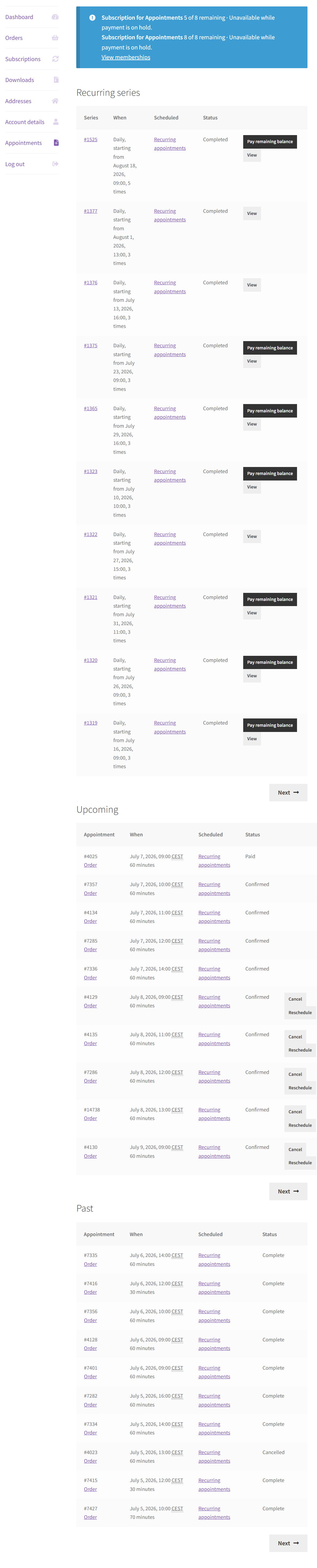
View series
My Account → Appointments → View series (view-series) for package detail:
- Pattern, session count, payment status
- List of occurrences with status
- Pay remaining balance (pay-first)
- Cancel future, Skip session, scoped Reschedule (per product rules)
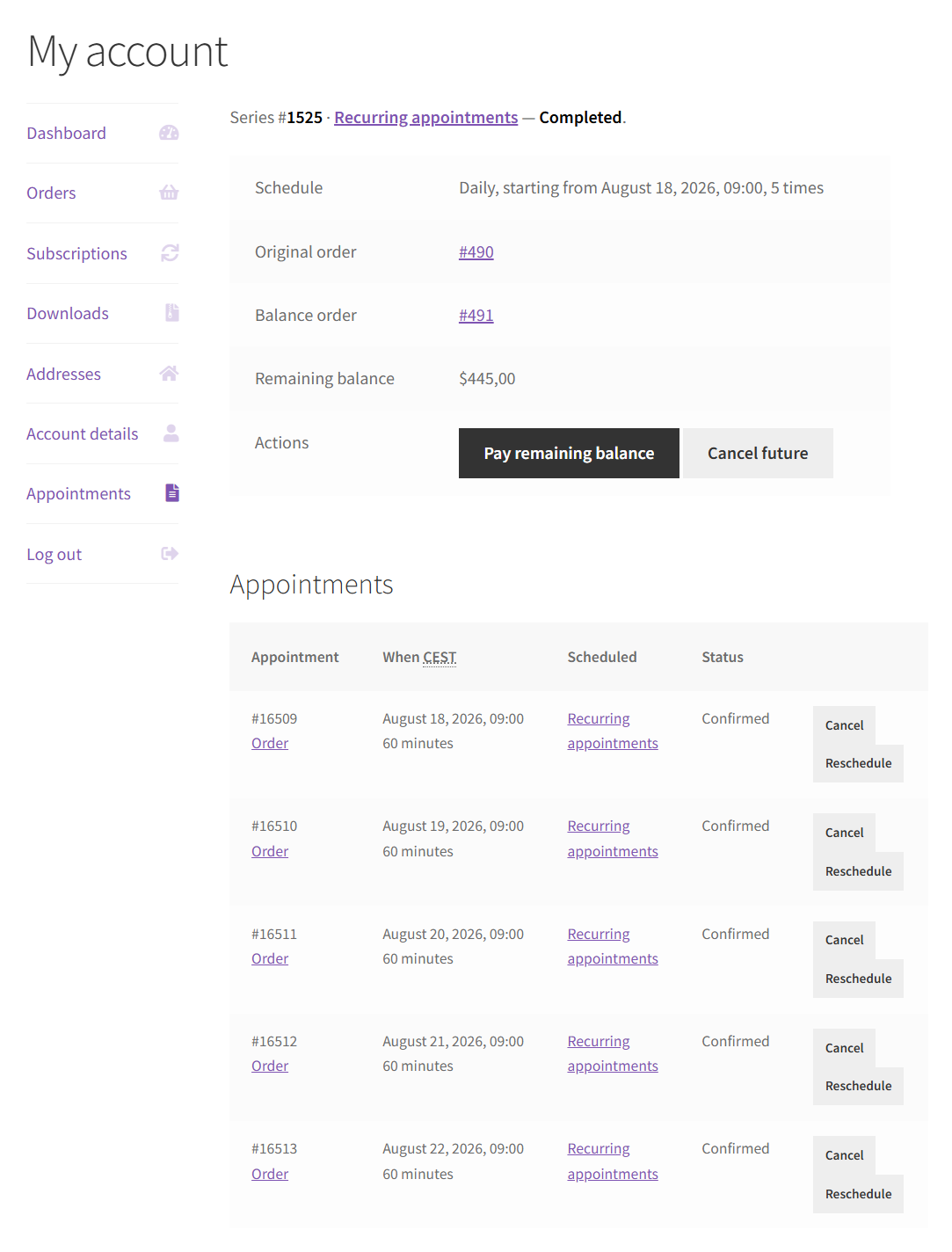
Scoped actions match admin Apply to behavior: change this session only, this and following, or entire series where allowed.
Emails
Configure under WooCommerce → Settings → Emails:
| When | |
|---|---|
| Appointment Series | Package confirmed; bulk cancel/update on scoped series changes |
| Balance / processing emails | Pay-first balance order created or paid (uses order email flow) |
Per-session Appointment Reminder and Appointment Confirmed still apply to individual occurrences. See Email Notifications.
Product add-ons
Per add-on option: Use once per recurring series — price and duration apply once for the whole package, not every session. Ideal for setup fees or equipment rental on class packs.
See Product Add-ons.
Virtual occupancy
While a package is in the cart or awaiting payment, the plugin reserves capacity for previewed sessions so slots are not double-booked during checkout.
Site-wide configuration (filters)
Settings → Appointments → Recurring packages was removed in 5.4. Use filters instead (see Hooks — Recurring & series after developer login):
| Filter | Purpose |
|---|---|
wc_appointments_recurring_enabled | Disable recurring packages site-wide |
wc_appointments_recurring_payment_options | Limit prepaid / pay-first per product |
wc_appointments_recurring_default_payment_model | Default payment model on the form |
wc_appointments_recurring_min_occurrences / _max_occurrences | Session count limits |
wc_appointments_recurring_min_billable_sessions | Minimum billable sessions in a package |
wc_appointments_recurring_allow_partial_checkout | Checkout when some preview sessions are unavailable |
wc_appointments_recurring_auto_create_balance_order | Auto-create pay-first balance order |
wc_appointments_recurring_balance_invoice_timing | When to send balance invoice email |
Related
- Customer Booking Process — single-appointment flow
- Membership credits — subscription billing period credits
- Pricing Rules — sessions-in-package discounts
- Integrations — Deposits, Subscriptions, PayPal