Availability Filter Block
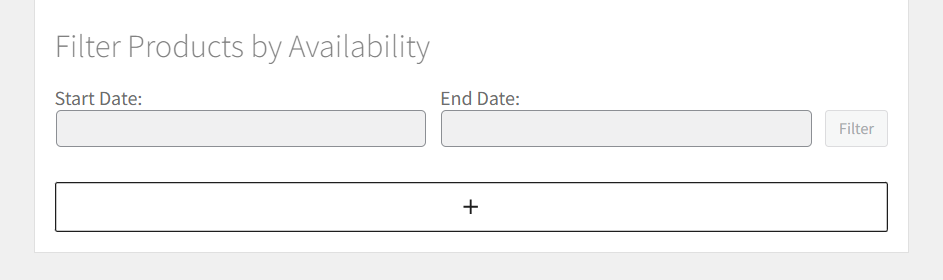
The Availability Filter block adds a date-range search widget so customers can see services available on their dates. This block enhances the shopping experience by allowing customers to filter products based on their preferred scheduling window.
Block Features
- Date Range Selection: Customers can pick start and end dates for availability filtering
- Real-time Filtering: Instantly updates product listings based on availability
- Flexible Placement: Works on shop pages, category archives, and custom landing pages
- Responsive Design: Adapts to different screen sizes and devices
- Integration: Seamlessly integrates with WooCommerce product loops
Add the Block
- Open the page (shop, landing, etc.) in the WordPress block editor
- Click + to add a new block
- Search for Filter Products by Availability or Availability Filter
- Insert the block where you want it to appear

Configure the Block
Basic Settings
- Title: Edit the title inline (defaults to "Filter Products by Availability")
- Date Format: Uses WordPress date format settings
- Placeholder Text: Customizable placeholder text for date inputs
Advanced Options
- Show End Date: Option to enable/disable end date selection
- Date Limits: Set minimum/maximum selectable dates
- Button Text: Customize the filter button text
- Loading State: Show loading indicator during filtering
How It Works
- Customer Selection: Customer picks Start Date (and optional End Date)
- Filter Application: Click Filter to apply the date range
- Product Update: The product list reloads showing only products available in that range
- Availability Check: System checks each product's availability rules and existing appointments
Availability Logic
The filter considers:
- Global Availability Rules: Site-wide availability settings
- Product-specific Rules: Individual product availability
- Staff Availability: Staff member scheduling (if applicable)
- Existing Appointments: Already booked time slots
- Capacity Limits: Maximum appointments per time slot
Use Cases
Service-based Businesses
- Consulting: Filter available consultation slots
- Healthcare: Show available appointment times for specific dates
- Salons: Display available service appointments
- Education: Filter class availability by date range
Rental Businesses
- Equipment Rental: Show available rental periods
- Venue Booking: Filter venue availability for events
- Transportation: Display available booking windows
Best Practices
Placement Recommendations
- Shop Page: Above product grid for maximum visibility
- Category Pages: Filter products within specific categories
- Landing Pages: Target specific services or promotions
- Search Results: Refine search results by availability
User Experience Tips
- Clear Labels: Use descriptive titles and instructions
- Default Dates: Set sensible default date ranges
- Visual Feedback: Show loading states during filtering
- Mobile Optimization: Ensure easy date selection on mobile devices
tip
Place this block prominently on product-listing pages (Shop or category archives) for the best user experience. Consider pairing it with sorting options for enhanced product discovery.
Technical Details
Block Attributes
title: Display title for the filtershowEndDate: Boolean to show/hide end date inputbuttonText: Text for the filter buttondateFormat: Date display format
Integration Points
- WooCommerce Product Query: Modifies WP_Query to filter by availability
- Availability Cache: Uses cached availability data for performance
- JavaScript Events: Triggers custom events for filtering actions
Performance Considerations
- Caching: Availability data is cached to improve response times
- Lazy Loading: Products load progressively for large catalogs
- Database Optimization: Uses indexed queries for availability checks
Troubleshooting
Common Issues
- No Products Found: Check availability rules and date ranges
- Slow Loading: Verify caching is enabled and database indexes exist
- Date Picker Issues: Ensure JavaScript is loading correctly
Debug Mode
Enable WordPress debug mode to see:
- Availability query details
- Cache hit/miss information
- Performance timing data