Rooms & Resources
How it works
Rooms and equipment can be required on products so one booking blocks that asset for others. On the product you assign alternatives (one is used per booking) and set Max at once.
What you need
- Hours working in Availability
- Locations & rooms (beta) on - same switch as Locations
Capacity vs Max at once
- Product Capacity (Inventory tab) = how many appointments share a time slot
- Staff row Quantity (when set) replaces product Capacity as the people ceiling
- Max at once (Resources row) = how many bookings can use that room at once
Staff Quantity can raise seats above product Capacity, but Max at once still caps the room. Example: Capacity 1, staff Quantity 5, Max at once 3 → customers see 3 seats, not 5. Details: Appointable product → Inventory.
Create a room or resource
- Appointments → Rooms & resources → Add New
- Title, optional featured image, and a venue when locations exist
- Publish
Max at once is set on the product, not on this screen.
Concurrent limit moved from the resource screen to each product's Resources tab as Max at once. Re-enter values on products; beta values on the old screen are not carried over.
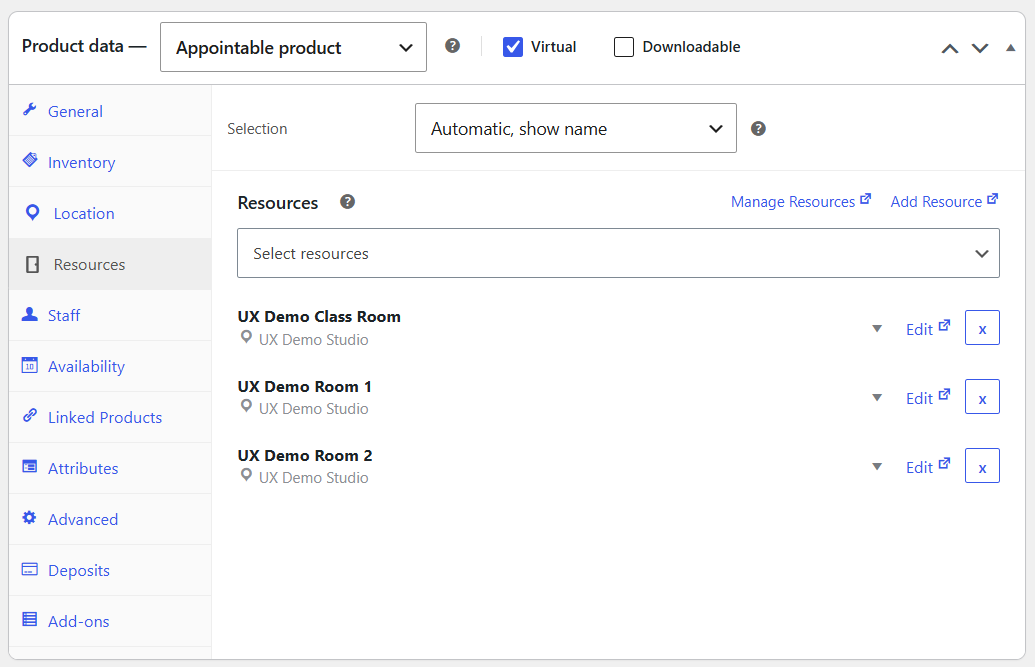
Product Resources tab
| Setting | Purpose |
|---|---|
| Label | Storefront label when Selection is Customer selects |
| Selection | Automatic, show name · Automatic · Customer selects |
| Assign list | Check alternatives (one is allocated or picked); grouped by venue when locations exist |
| Max at once | Concurrent bookings for that resource on this product |
| Additional Cost | Optional extra (or discount) |
Manage / Add beside the title open Rooms & resources in a new window. Drag order under Customer selects sets the default pick.
Storefront
The resource picker sits under Location and before Staff. It filters by venue when the customer chooses a location. Automatic has no dropdown.
Closed hours for a room (if any) are edited in Availability on that resource's row. Rooms support Range of days (whole weekdays open or closed), matching day-duration schedules.
With Automatic selection, seats follow each room's Open window (not only Closed blackouts). A room Closed for a day leaves no bookable seats for that room. When Selection is Automatic, show name, the allocated room name appears to the customer.